You need a phono preamp somewhere in the chain, either the one already built into your turntable or a small external box. Without that stage, the turntable’s signal is too quiet and too unevenly balanced to feed a receiver’s AUX, CD or tuner input, and the result is faint, thin or distorted playback.
The good news is that the whole job is about fifteen minutes of cable work once you know which kind of turntable you own. Plug the turntable into the preamp, plug the preamp into the receiver, fasten one ground wire, and turn the volume up slowly. That is genuinely the whole procedure.
What trips people up is not the plugging in, it’s the signal levels. A receiver without a PHONO input is not broken, it simply has no idea what to do with a cartridge’s output. This guide covers what to buy, how to wire it, and what to do when the sound hums or comes out quiet.
Table of Contents
- What You Need
- Step-by-Step
- Step 1: Check Your Turntable’s Preamp
- Step 2: Place the External Phono Preamp
- Step 3: Connect the RCA Cables and Ground Wire
- Step 4: Power Up and Test the Signal
- Troubleshooting if it does not sound right
- Common Mistakes
- Setup tips that make the difference
- Frequently Asked Questions
- Do I need a phono preamp to connect a turntable to a receiver?
- Can I connect a turntable to an AUX input?
- Does a passive phono converter work instead of a preamp?
- Why does my turntable hum through the receiver?
- Can I connect a turntable to a Bluetooth receiver?
- How do I tell if my turntable already has a built-in preamp?
- Conclusion
What You Need
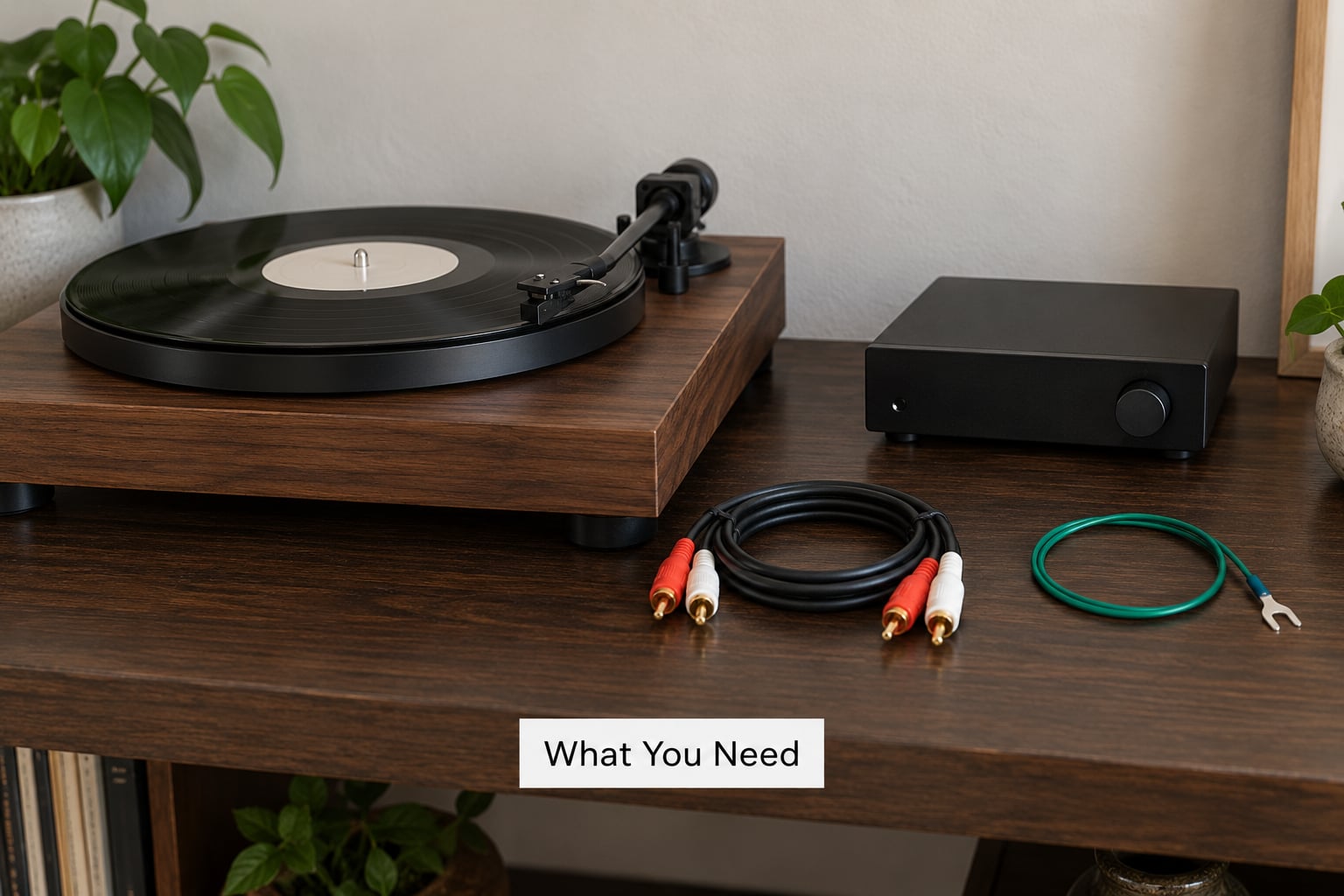
Before you unplug anything, check what the turntable already does. Most turntables made in the last twenty years have a small preamp on board and a switch on the back panel, often labelled PHONO / LINE, sometimes just a tiny pushbutton near the RCA outputs. If yours has one, you may not need to buy anything at all.
Here is the shopping list if it does not:
- The turntable itself, with its stock RCA output cable
- A stereo receiver or amplifier with at least one line-level input (AUX, CD, TAPE, VIDEO or TV Audio)
- An external phono preamp — one with a power supply, not a passive converter
- A pair of RCA cables if you need extra length or your turntable’s cable is short
- A ground wire with spade or fork terminals, usually supplied with the turntable
- A small screwdriver for the binding posts
Understanding the two signal levels makes the rest obvious. A phono-level signal comes out of the cartridge at a fraction of a volt, recorded with the bass cut and treble lifted so the record would not groove itself to pieces. A line-level signal is what every other source on your system produces: CD, streaming, tape, TV. The preamp’s job is to reverse the record’s curve, apply about 40 dB of gain, and hand you a normal line-level signal.
Move a line-level signal into a phono input and you get the opposite problem, which is far worse: a loud, thin, honking mess. Remember that direction for later, because it is the single most common wiring mistake people make.
A quick note on cartridges, because it affects which preamp you pick. Moving magnet, or MM, cartridges output roughly 3 to 5 mV and are by far the most common. Moving coil, or MC, cartridges output around 0.3 to 1 mV and need a preamp with real gain, usually with a selectable MM/MC setting. Most budget external preamps handle MM perfectly and MC adequately; if you have an MC cartridge you will want a preamp with a low-noise gain stage.
Step-by-Step
Step 1: Check Your Turntable’s Preamp
Turn the turntable around and look at the back panel. You are hunting for a small toggle or button marked PHONO / LINE, PREAMP ON / OFF, or PHONO EQ. Turntables like the Audio-Technica AT-LP-series and many beginner models have it in an awkward spot, sometimes underneath the plinth, which is where most people fail to find it.
The switch controls which signal leaves the RCA outputs. In LINE mode, the turntable has already applied the RIAA correction and boosted the signal, so it behaves like a CD player. In PHONO mode, the raw cartridge signal goes straight out and needs an external preamp.
Get it wrong and you will know within seconds. PHONO mode feeding an AUX input gives you a quiet, thin, bass-free sound, because nobody is adding gain or correcting the curve. LINE mode feeding a PHONO input gives you distorted, overly loud, tinny playback, because the receiver is boosting an already-boosted signal.
If your turntable has the switch and your receiver has a line-level input, skip the external preamp entirely. That is the simplest setup, and it covers the majority of people asking this question.
Step 2: Place the External Phono Preamp
When the turntable has no built-in preamp, or you would rather use a separate one, the signal path is a straight line with three boxes:
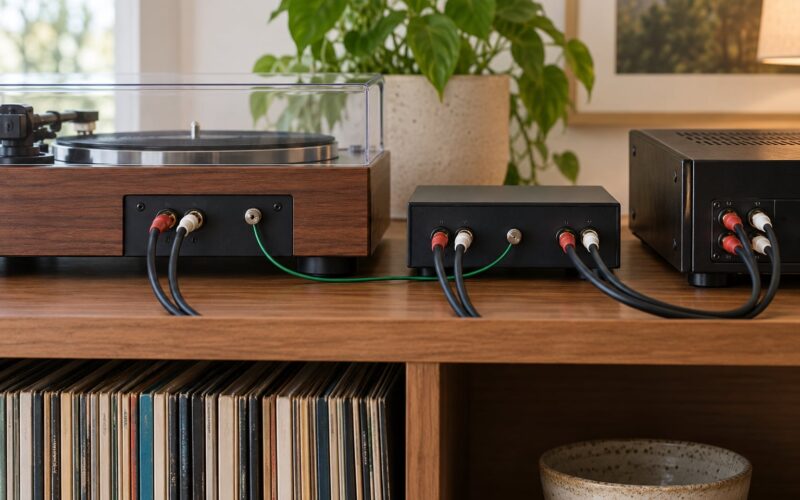
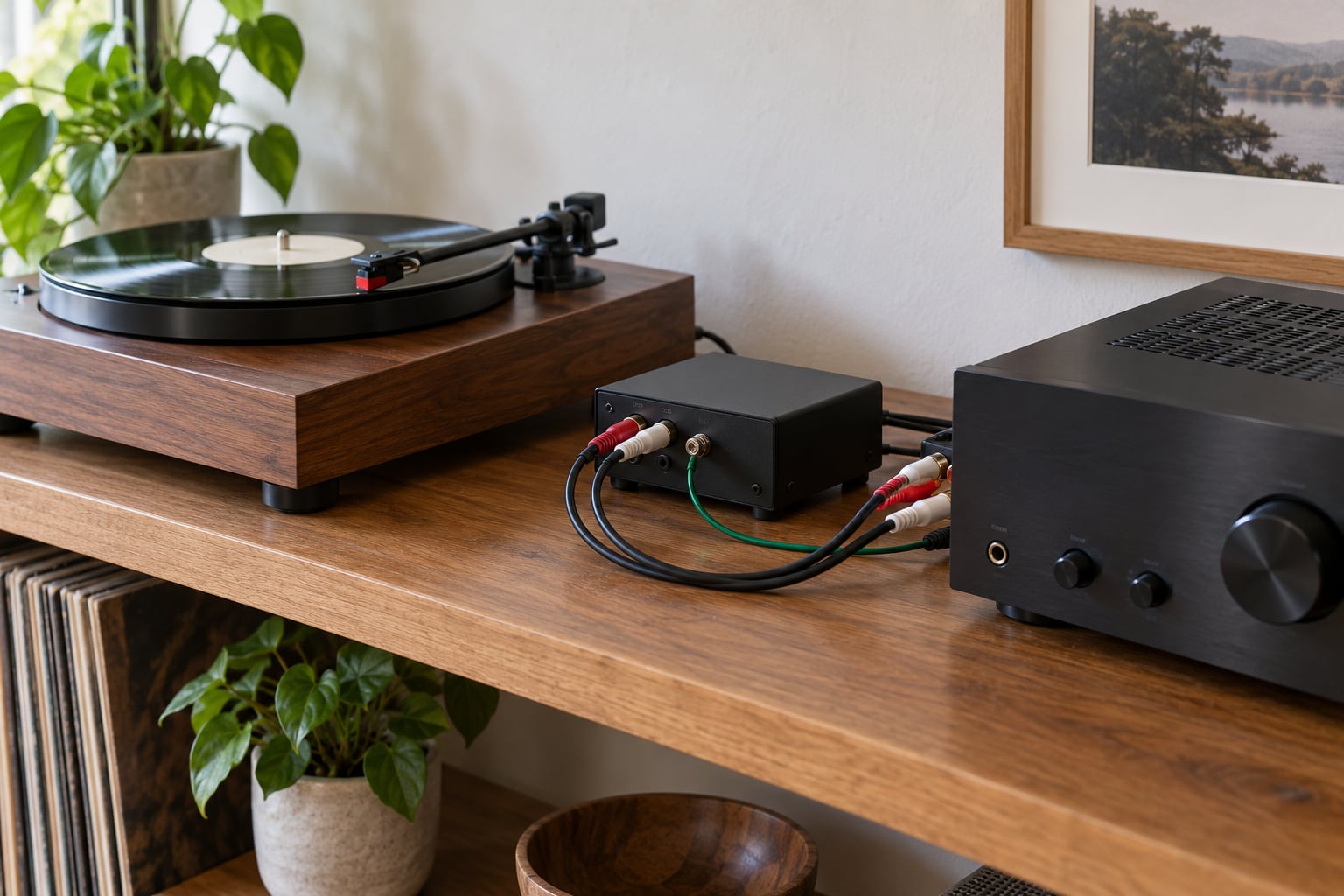
Turntable → external phono preamp → receiver → speakers
The receiver sits at the end of the chain because its AUX, CD and tuner inputs expect a line-level source. Plug a phono-level signal straight into them and the receiver has no way to amplify it enough, so you get a faint whisper of music under the noise floor. The record is playing perfectly the whole time; the receiver just cannot hear it properly.
Small preamps like the ART DJPREII, the Pyle PHPVT02 and the Behringer PHONO are the usual recommendations on forums for moving magnet cartridges, and users on r/BudgetAudiophile report good results with each for a basic MM setup. Position does not matter much — a metal box sitting next to a receiver can pick up interference, so give it a little space and keep it off the same shelf as a humming power brick if you can.
Step 3: Connect the RCA Cables and Ground Wire
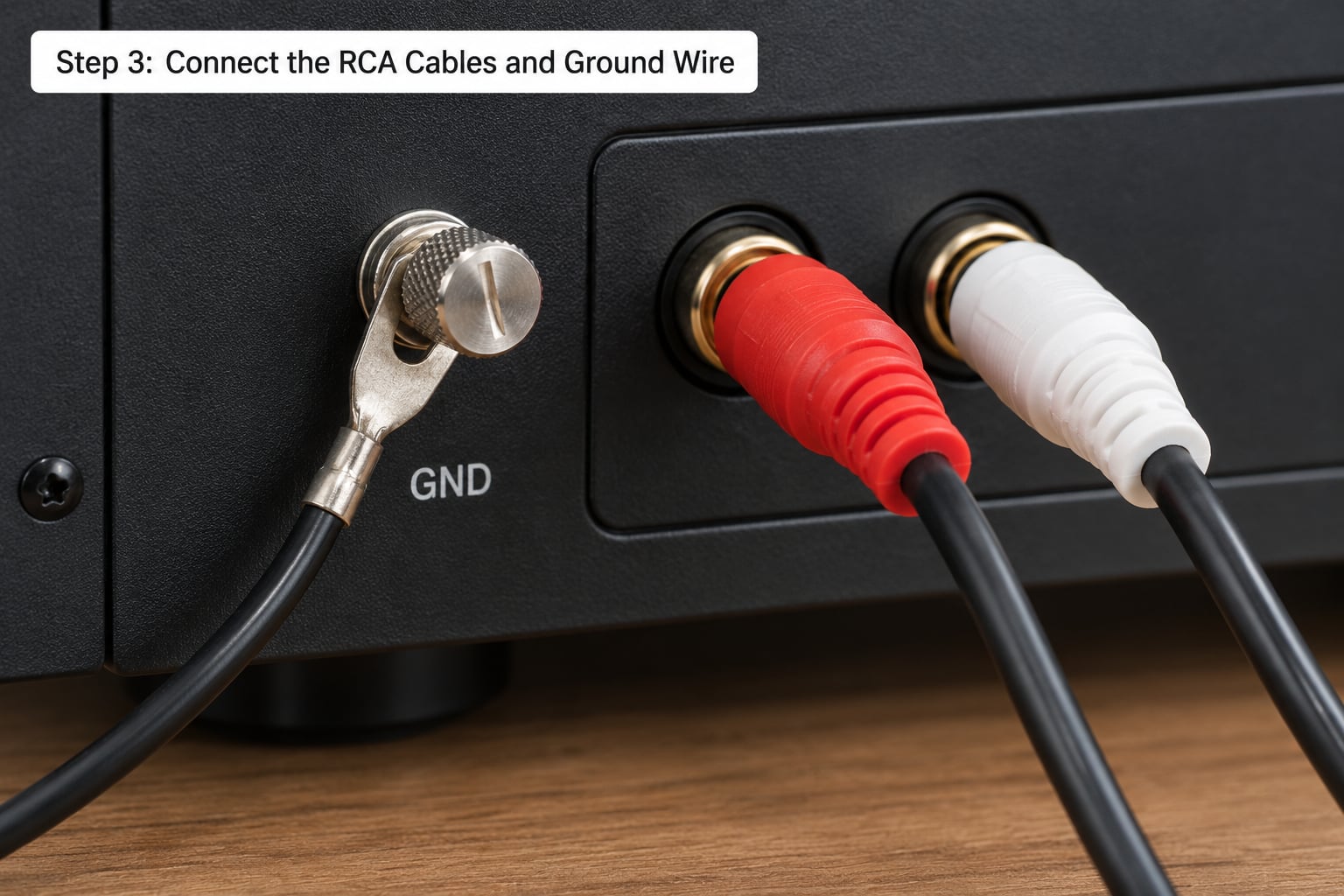
Work through this in order, with everything unplugged.
First, run a pair of RCA cables from the turntable’s L and R outputs to the preamp’s phono inputs. These are the small round jacks, usually labelled PHONO IN or just left unmarked near the ground post. Match red to right and white to left. The red and white marks on the RCA plug ring match the printed L and R above the receiver’s input.
Second, run a second pair of RCA cables from the preamp’s line outputs, marked LINE OUT or just OUT, to the receiver. Any line-level input works: AUX, CD, TAPE, VIDEO, TV Audio, MD. On an AV receiver there may be no input literally labelled AUX, which trips people up, but CD, TAPE and TV Audio are all the same thing electrically.
Third, and this is the step everybody rushes, attach the ground wire. The turntable’s ground wire is a bare or green-insulated wire with a fork, spade or pin terminal. Find the metal binding post on the receiver marked GND, or the ground terminal on the preamp if your preamp has one, and loosen the knob, wrap the terminal around the post or under the nut, and tighten it until it holds firm.
Never attach the ground wire to an RCA signal terminal. It is not a ground, and doing so routes noise straight into your audio path. If your receiver has no GND post at all, the chassis screw near the input panel is the traditional fallback, and it works in practice even though it is not textbook.
Use your fingers to push each RCA plug firmly into its socket until it clicks, or tighten the knurled collar on screw-type connectors. A connector that is merely snug produces intermittent crackle, and one that is half in will hum.
Step 4: Power Up and Test the Signal
Power order is simple and worth following: preamp first, then receiver, then turntable. Give each a moment. A preamp that powers up after the source can send a thump through your speakers, and on some receivers a brief surge straight into the phono stage.
Before anything plays, pull the receiver volume down to about one quarter. Then select the input you plugged into, drop the needle, and bring the volume up gradually until you reach a comfortable level. A correct signal sounds like music: full bass, clear vocals, no hiss riding on top.
For calibration, set the receiver to roughly where you listen to a CD or the TV, then adjust the turntable’s own volume control if it has one. Most turntables do not. The preamp or receiver does the level matching, and you want roughly the same perceived loudness on vinyl as on every other source.
If your AV receiver has a Pure Direct or Analog Direct mode, turn it on for vinyl playback. It bypasses tone controls, sound field processing and digital circuitry that can dull a phono signal. On Yamaha and Denon models the equivalent is often called Straight or Source Direct.
Troubleshooting if it does not sound right
Hum or buzz. Nearly always the ground wire, or a loop in the cable routing. Seat the ground terminal firmly, keep both RCA cables bundled together rather than spread apart, and move the preamp away from power transformers and dimmer switches.
Very quiet sound. The turntable is probably in PHONO mode with no preamp in the chain, or the cartridge is a low-output MC model on a preamp set to MM. Check the switch first, then check the MM/MC selector.
No sound at all. Confirm the receiver’s input selector matches the jack you used, check that the cartridge or stylus is seated on the record, and make sure the receiver’s speaker selector and zone are on.
Distorted, tinny or far too loud. You have cascaded the preamps. Either the turntable’s LINE mode is feeding a PHONO input, or the receiver’s PHONO input is receiving line-level audio. Exactly one of those two stages should be active in the chain.
Common Mistakes
Using a passive converter instead of an active preamp. Passive converters are typically just resistors. They can attenuate a signal, but they cannot apply the RIAA curve and they provide almost no voltage gain, so the result is quiet and wrong. Buy a powered preamp with an AC adapter. This is the mistake people make when they buy the cheapest possible box, and it is the reason a first setup sounds bad.
Using the receiver’s PHONO input for a line-level signal. If your turntable has a built-in preamp and you leave it on LINE, the signal leaving it is already at line level. Feeding that into PHONO applies roughly 40 dB of gain a second time, which produces harsh, distorted, blown-out playback. Use AUX, CD or TAPE instead.
Leaving the turntable’s preamp switch in the wrong position. The rule is simple: one and only one preamp stage active. Turntable switch on LINE means no external preamp. Turntable switch on PHONO means you need one.
Ignoring the ground wire. A turntable without its ground wire connected is the classic source of a low hum that rises when you touch the metal parts. Ground the turntable to the preamp or to the receiver, whichever the preamp instructions specify.
Loose RCA connections. Push until it clicks. Half-seated plugs cause crackle, buzz and intermittent dropouts that make people blame the preamp.
Turning the volume up before the signal is right. Start low every time. If the switch is in the wrong position you get loud distortion fast, and a receiver cranked to maximum while playing a quiet, distorted signal is a bad neighbour.
Confusing speaker outputs with audio inputs. Speaker terminals are for bare wire only and they take a much higher voltage. An RCA plug will not fit, and it should not be forced. Speaker-level out to speaker-level in needs its own amplifier.
Assuming TAPE is different from AUX. On nearly every receiver, stereo, vintage or AV, TAPE and AUX are interchangeable line-level inputs. If one sounds bad, the other will too. It is the same signal path.
Setup tips that make the difference
Rename the input on your receiver if it has a menu for it, so the next person in the house does not switch away mid-album. Keep the turntable on a firm, level surface away from speakers that might cause feedback. Leave a finger of space under the plinth for airflow if your receiver runs warm.
Once it is playing, spend ten minutes setting the tracking weight and anti-skate properly. A correctly set-up turntable sounds noticeably cleaner than one left at factory settings, and that is true of every cartridge.
Frequently Asked Questions
Do I need a phono preamp to connect a turntable to a receiver?
Only if something in your chain is not already doing the job. If your receiver has no PHONO input, then either your turntable has a built-in preamp or you need an external one. Connecting a phono-level signal straight to an AUX input gives you very quiet, thin, bass-free playback, because nothing is applying gain or RIAA equalization.
Can I connect a turntable to an AUX input?
Yes, as long as the turntable is putting out line-level audio. Set the turntable’s preamp switch to LINE and plug the RCA cables into AUX, CD or TAPE. If your turntable has no built-in preamp, put an external preamp between the two boxes so the AUX input receives a proper line-level signal.
Does a passive phono converter work instead of a preamp?
Barely. A passive converter is a network of resistors and capacitors with no power supply, so it cannot apply the reverse RIAA curve or provide the voltage gain a cartridge needs. Playback comes out quiet and tonally wrong. An active preamp with an AC adapter is the right tool, and it is inexpensive.
Why does my turntable hum through the receiver?
Almost always a grounding problem. Check that the ground wire is firmly attached to the GND binding post on the preamp or receiver, and keep both RCA cables bundled together so they are not acting as an antenna. A hum that comes and goes with volume is a different issue: that is usually noise from a dimmer or power supply nearby.
Can I connect a turntable to a Bluetooth receiver?
You can, using a Bluetooth transmitter plugged into the preamp’s line outputs. Sound quality is compressed and there is a delay of roughly 30 to 50 milliseconds, which you will notice on video but not on music. For audio only it is a reasonable option, though a wired connection always sounds better.
How do I tell if my turntable already has a built-in preamp?
Look at the back panel for a PHONO / LINE toggle, a PREAMP switch, or a button near the RCA outputs. If there is one, the turntable can output either phono-level or line-level audio. Some manuals call it a phono EQ switch. If no switch exists and there is no manual mention of one, assume the output is phono-level and add an external preamp.
Conclusion
To connect a turntable to a receiver without a phono input, make sure one preamp is in the chain and only one. Turn the turntable’s preamp switch to LINE and go straight into AUX, CD or TAPE if it has a built-in stage; otherwise add an external phono preamp between the two boxes, connect the ground wire to the GND post, and power everything up in order before testing at a low volume.
Start with the back of the turntable. Find that PHONO / LINE switch, and the whole setup falls into place from there.